Official comment

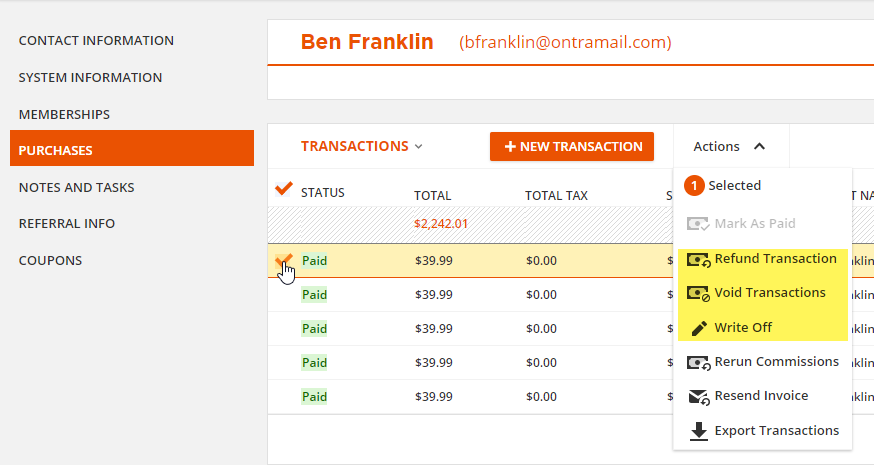
Yes, you can find the purchases in the person's Contact Record on the Purchases tab. Select the purchase in the TRANSACTIONS log and the Actions menu will give you three choices to refund, void or write off the transaction. Here's how those three choices impact the sales data in ONTRAPORT.
Refund Transaction: If you are manually loggging a transaction in ONTRAPORT, and not charging the contact's credit card, you can use this action to enter a refund for the manual transaction. The refund effectively reverses the sale in the sales reports for the Contact while leaving the original purchase date and details in place. Note that the refund date and time is when you actually perform the refund in the Contact record and can't be "back dated" to another time.
Void Transaction: A voided transaction reverses the sale completely, as if it never happened.Check with your accountant if you are using the records in ONTRAPORT for accounting purposes. It may require manual journal enties in your accounting package to explain the reason for the "void".
Write Off: This is usually used only for transactions that fail, and go to collection. In most accounting systems you must use a reasonable period of time and write off a transaction rather than refunding or voiding it (GAAP, the United State's "Generally Accecpted Accounting Principles" guidelines requires using write off status if your company is on accural basis rather than cash basis).