Official comment

Security software and ad blockers will block loading some resources. The solution is to disable the security software or ad blocker for your WordPress site by whitelisting it, or disabling it altogether.
This solves the issue most of the time. The error can also pop up with some aggressive cloud-based website protection programs such as Cloudflare.
In most of the ad blocking software you can click the program's icon on the browser bar and click to whitelist your site, or disable it for that page. After doing this you should be able to reload the page and PilotPress will be able to load the js39 JavaScript program that is being blocked. You may have to log out, clear cookies and cache and log back in.
Here's an image of disabling the blocking in UBlock Origin, a popular Chrome browser extension:
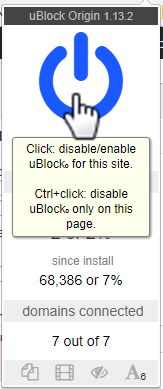
Don't worry, the loading of "js39" is not an issue on the live site and your customers won't need to disable their ad blockers; this is only an issue inside the WordPress editor.
If you have eliminated any browser extensions as a cause, ask your webhost if you are running behind Cloudflare or if there is other security software on the server side that might cause the error. If they can disable it temporarily for testing, ask them to do so. If the problem persists, contact ONTRAPORT support.

