Official comment

We believe there are very few situations where more than A/B testing is required. In particular, we are very concerned that non-significant results will cause people to make poor decisions. So we encourage people to do just A/B testing and not venture into the world of multiple split tests.
With that caveat, there is a way to split your audience in two using a Condition, and then apply split tests to both paths from that Condition. The Condition uses the "Field is this value" operator to see if the "Contact ID" field "Ends with" a number. The Contact ID number is assigned by ONTRAPORT sequentially, so it can be used to sort in this way. The last digit ... the "Ends with" number ... will be a single number from 0 to 9. Approximately one tenth of your contacts will have a Contact ID number ending in "0", one-tenth ending in "1", etc.
In this example, we are using multiple statements to determine if the Contact ID field ends with a 0 through a 4, splitting that half of the Contacts down the "Yes" path. 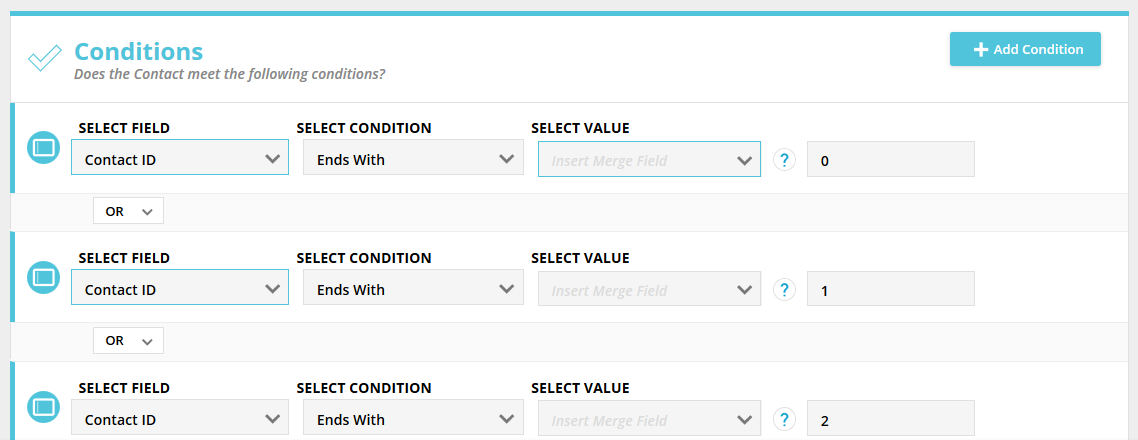
Note that you must use the "OR" operator between each condition statement to filter properly. If you leave it at the default "AND" no one will match the Condition and all will go down the "No" path.
You then apply the Split Test element to each side of the Condition: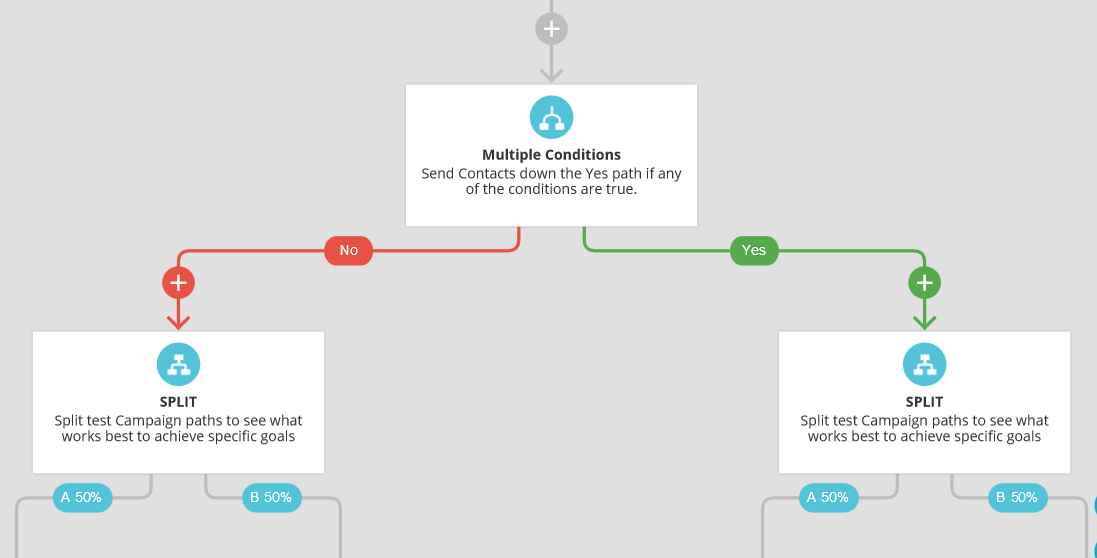
In Performance Mode, each path will report it's statistics independently.

