Post

2 followers Follow
0
Avatar

Been client since 2010 & I need to see my files more clearly!

Tonya Tittle

i use to be able to see all of my files easily on one page and had them ordered in categories. i have tolerated them as long as i can but now since i must change lots of paperwork due to my relocation of my biz I need more user friendly experience. currently, as it when it only shows you a page at a time and in no particular order it does not work!!!! there has to be a solution. i have 257 files and need to ability to be effective and efficient with my time.  please advise asap. i spoke with whitney on screen share and she suggested bringing this to your attention.

i can also be reached on my cell at xxx-xxx-xxxx and am on eastern time zone.  i can chat today until 7:30 p.m. or can be reach tomorrow from 10 a.m. - 7 p.m.

please advise and thanks in advance for your attention to this matter.

customer #xxx Energy Fitness

Tonya Tittle, www.energyfitness-sc.com

Answered

Official comment

Avatar

Hi Tonya - Thanks for your feature request! I obscured your phone and customer number because this is a public forum, and didn't want the spammers to get your info. 

We don't have a way to easily manage these files in bulk. But here are some ways to make it easier. 

In Administration > Data Tab > File Manager you can see your files. The column headings can sort them; click on the "Date Uploaded" column heading to see them in the order of upload date. You can also select them all and download them as shown in the image. 
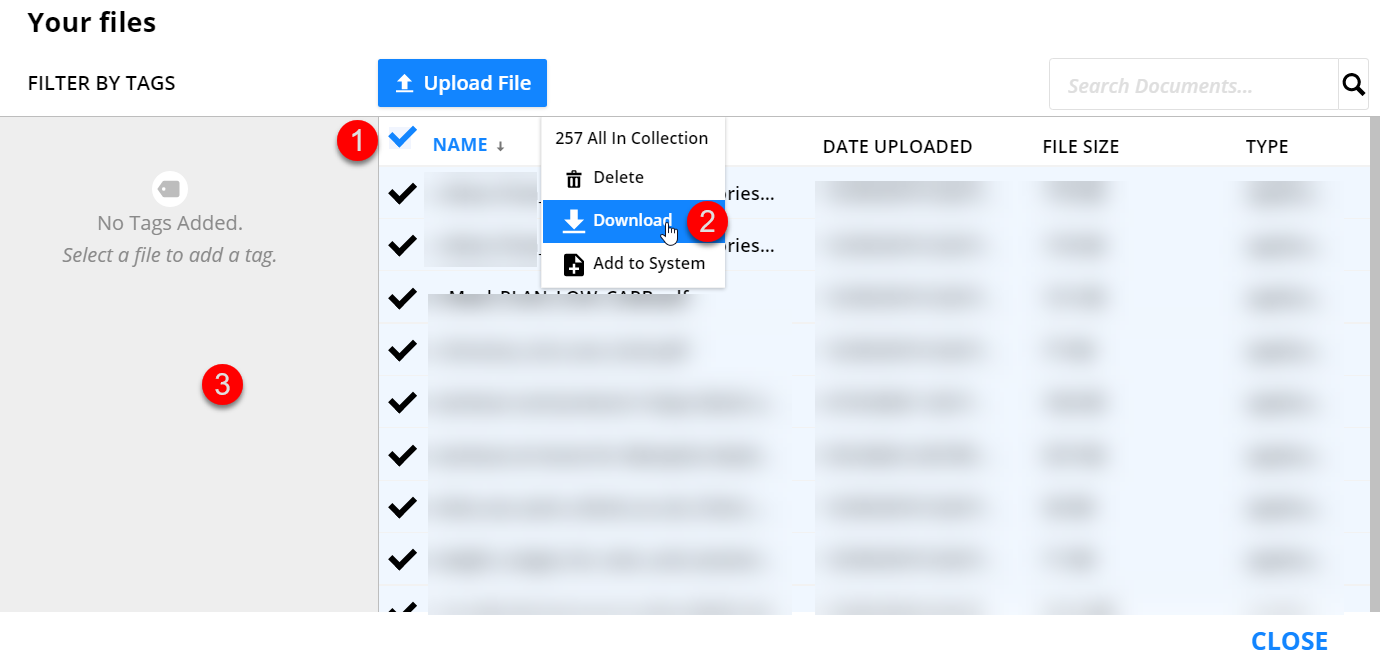
You can see them easier in a System. I created a System for you named "Files in File Manager Jun 21, 21". You can access it from the Systems navigation item when you log in. You can set the page to view  50 at a time this way, which makes it easier to use than the File Manager (where you can see 25 at a time). I have also copied the listing into a Google Sheet that I'll share with your energymemphis email address. 

Frank Hagan
Comment actions Permalink

Please to leave a comment.

1 comment