Post

2 followers Follow
0
Avatar

Can I add an unsubscribe link at the top of my email?

Partners Team

I want to make sure my newsletter subscribers are fully engaged, and I never want to get "spam" complaints from them. I would like to add a small link at the very top of my newsletter for them to unsubscribe.

This is in addition to the link ONTRAPORT adds at the bottom. I want it to say something different than the standard "Manage Your Subscription" too, so it's clear they can unsubscribe. Maybe something like "Unsubscribe from All Our Mailings". I'm using the standard HTML editor in ONTRAPORT with our own template.

How can I add that link?

Answered

Official comment

Avatar

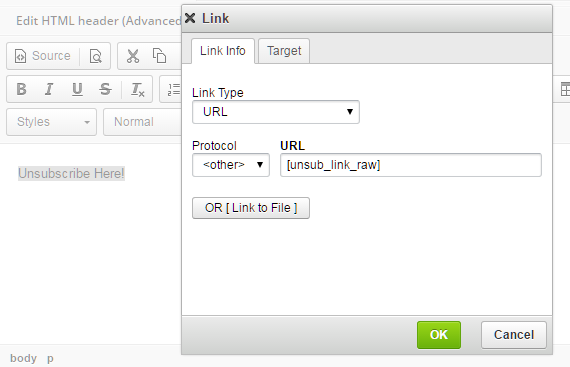
If you want to customize the hyperlink use the [unusb_link_raw] merge field. You can either use it in an HTML block in ONTRApages using raw HTML code such as:

<a href="[unsub_link_raw]"> Your Hyperlink Text Here </>

Or you can use the HTML Email editor and use the link builder, specifying the "Other" protocol as shown here: 


Frank Hagan
Comment actions Permalink

Please to leave a comment.

2 comments

0
Avatar

Our Certified Consultant, Alejandra, Chief of Making it Happen, answered this question:

Yes, I used to do this. When you're creating your message, write your sentence at the top, and then use the merge field [unsub_link] it will show up in the email as "Click Here to Unsubscribe"

There's also an [unsublinkraw] but I've never used it.

Frank Hagan 0 votes
Comment actions Permalink