
Official comment

The Hosted tab works for videos uploaded into an ONTRAPORT account. The ONTRApages Free and Premium account share the same editor but do not have video storage built in. BUT, you can host the video anywhere you please and use that service's embed code or HTML5 to embed it into the Embedded tab.
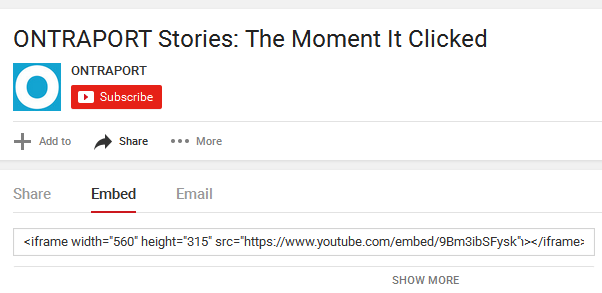
For YouTube videos, use the Embed code provided after you click Share:
For Wistia, Vimeo, etc. use their embed code (we have more on that HERE).
You can also use HTML5 to display and control videos stored in services like Amazon S3, etc. A good resource for using the HTML5 video tag is found HERE. For most people, HTML5 code like that shown in this screenshot will be sufficient to show a video with player controls set to autoplay when the page is visited:
<video width="320" height="180" controls><source src="https://s3-us-west-1.amazonaws.com/ontraport-support/Template+Images/Sites/Landing+Pages/Sites+-+ONTRApages+-+Blocks+-+Video.mp4" type="video/mp4"></video>
The first tag, <video width="320" height="180" controls> sets the width and height of the video. Most templates will look for a 16:9 aspect ratio for videos. The parameter "controls" add the VCR-like controls to the bottom of the video to start, stop, etc. You can add other parameters to this first tag as well; '<video width="320" height="180" controls="" autoplay="">` will set the video size, add the controls, and set the video to autoplay when the page is loaded.
The second tag, <source src="https://s3-us-west-1.amazonaws.com/ontraport-support/Template+Images/Sites/Landing+Pages/Sites+-+ONTRApages+-+Blocks+-+Video.mp4" type="video/mp4"> sets the URL to the video. HTML5 can play .mp4, .ogg and .webm video types only.
You should be able to return to the page editor and edit the code again. It may take a few seconds for the current video to load; because the ONTRApages editor is a true visual editor, it will update the view in the Canvas when the code is loaded. If waiting a few seconds does not restore the ability to edit the code, please let us know!

