Post

2 followers Follow
0
Avatar

What's the perfect image size for the most of the blocks?

Partners Team

Hi, I just wanted to know what's be best size for pictures for example in the testimonial block. Some people suggested me to re-size them but I'm wondering what if somebody see the website in a bigger screen, will the images look pixelated? Thank you and bless you all!

Answered

Official comment

Avatar

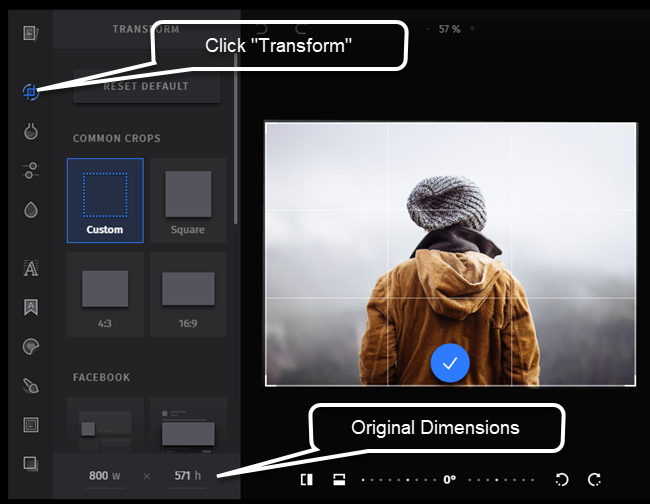
Our new image editor is set for release today. Using it, you can see the original dimensions of the image used in the template by clicking the "Transform" icon and then noting the image dimensions at the bottom of the settings pane:

Frank Hagan
Comment actions Permalink

Please to leave a comment.

3 comments

0
Avatar

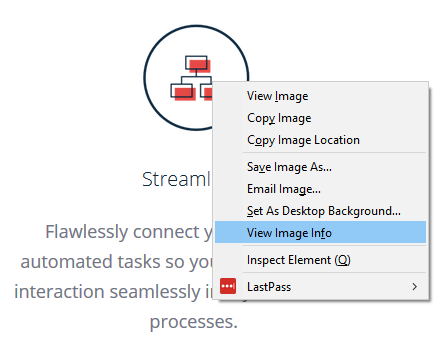
The best practice is to determine the size of the original image in the template. One way to do that is to select the image for editing and right click on it, then choose "View Image Info" (in Firefox):

image description

For Chrome, add the View Image Info extension to get this capability. 

You can also invoke the image editor and click on "Resize" (the original image dimensions are shown). Clicking on the link below will show a short video of the process:

http://clientvids.s3.amazonaws.com/53...

Frank Hagan 0 votes
Comment actions Permalink
0
Avatar

We added the ability to resize an image in the photo editor. While in the Transform menu, just above the dimensions of the image, you will see a checkbox for "Lock Resolution". Check that box and input your new width or height (the other value will automatically adjust when you tab or click out of the dimension box). 

A short video of this is here.


Frank Hagan 0 votes
Comment actions Permalink