
Official comment

ONTRAPORT has updated the ONTRAforms and ONTRApages editor to accept the extended UTF-16 characters that are used to display Emojis. This means you can use them in your form and page layouts. Just copy / paste the emoji from a site such as Get Emoji or emailmarketingtipps.de into the form or page where desired.
Emojis can be used in email subject lines by copying and pasting from a site such as emailmarketingtipps.de but, due to the way different email programs display them, may have unexpected results. These limitations are not due to anything ONTRAPORT is doing, but to the programs themselves:
- Lotus Notes: Not supported. Display will fail. Emoji may be represented by ☐
- Outlook 2003: Not supported. Display will fail. Emoji may be represented by ☐
- Outlook.com: May replace emoji with the word "emoji" and a small black graphic. Usually will show emoji.
- iOS devices: May replace emoji with the word "emoji" and a small black graphic.Usually will show emoji.
- Gmail: May display emoji in different color or size than expected.
- Hotmail: May replace emoji with the word "emoji" and a small black graphic. May display emoji in different color than expected. Most Hotmail clients have migrated to Outlook.com.
We don't recommend using emoji as the entire subject line. 👀 ❤️ 🐑 ("eye heart ewe") may be rendered "☐ ☐ ☐" by some email clients.
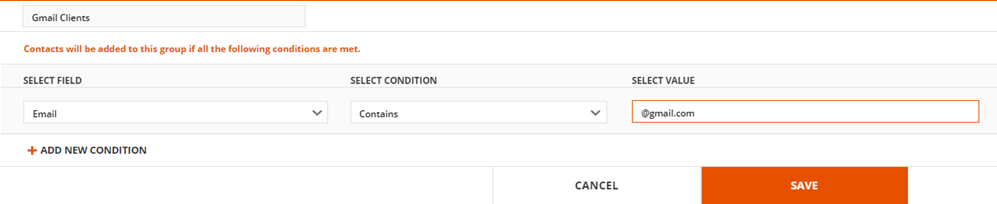
If the message is important, and you care about open and click through rates, we recommend testing with the email clients your customers use most, and creating different emails for programs or services that don't display your emoji inspired message correctly. You can create Groups of different email domains for Gmail, Hotmail, Yahoo, and Outlook.com using the field Email and "Contains" with the domain name specified.
When testing email send the message to test contacts in the Contact Record instead of using the "Send Test Email" or "Preview" buttons. The emoji will not display correctly using those functions because the email is not fully processed for merge codes, etc. before being sent.

