Post

5 followers Follow
0
Avatar

Can I have an image from an ONTRApage show on the Facebook preview when I share it?

Partners Team

How do I get an image to show from an ONTRApage when I share it on Facebook? I want to make it so that the images from ONTRApages show up in the link image area when shared. Thanks!

I believe I need to use meta tags, or opengraph meta tags, something like that.

Answered

Official comment

Avatar

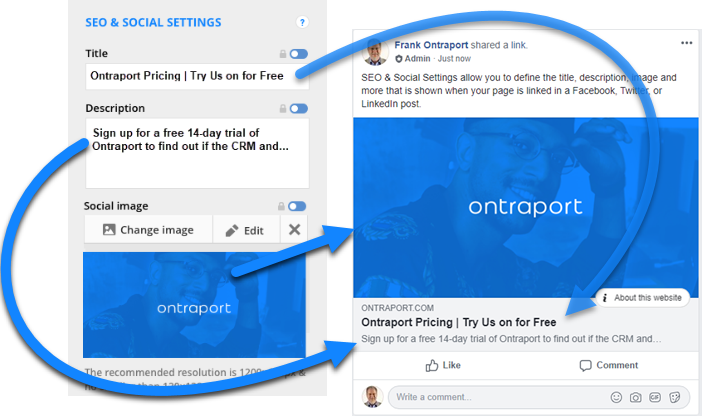
We released new settings to make it easier to specify how previews of your pages look when linked in Twitter, Facebook and LinkedIn. Navigate to the Page Settings >> SEO & Social Sharing and you'll see them! You can read more about this in our support article

Frank Hagan
Comment actions Permalink

Please to leave a comment.

2 comments

0
Avatar

You can customize it using the appropriate Facebook meta tag.

Both ONTRAPORT and ONTRApages Premium allow you to add Custom Header Code to the page. Click Settings to find the section.

You will need the full URL to the image you want to use. You can go to the published ONTRApage and right click on the image. Depending on your browser, you should have an item like "Copy Image Address" (Chrome) or "Copy Image Location" (Firefox). Copy the URL of the image on the page you want to use.

In the Custom Header Code section enter this code:

<meta property="og:image" content="

Paste your image URL into the code, and finish up with this at the end:

" />

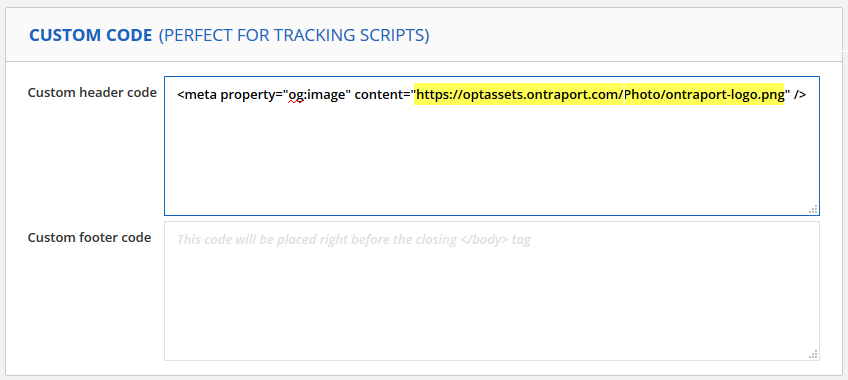
Your completed code will look something like this. In the image, the URL to my image is highlighted. Note that your URL will be different.  


Facebook prefers images that are at least 1200 x 630 pixels. They may crop or stretch your image if it is smaller. In some cases they stretch it, then crop it. If they find another way to mutilate your image they may add that too. 

You can upload the image to the ONTRAPORT File Manager and use that URL for the Open Graph tag. 

Facebook caches these images so if you ever need to force it to reset, check out this tool. For more best practices, check out this link. Here is some more information:

Facebook Open Graph META Tags

A Facebook Guide to Sharing for Webmasters


Frank Hagan 0 votes
Comment actions Permalink