
Official comment

Effective July, 2016, you can have ONTRAPORT automatically use the currency symbol of your choice! Note that we do not recommend changing the currency symbol unless you also have your payment gateway set to charge in that currency. Here are the steps we recommend:
1) Configure your payment gateway to accept the currency you wish to bill in, and note that there are potential costs associated with your choice. If ONTRAPORT has already set your account to bill in the currency you may have done this already.
- Some gateways, such as Stripe, will accept different currencies but submit them into your bank without question. That can lead to additional fees assessed by your bank as the funds are converted. Make sure you have the gateway configured so that you will avoid these charges.
- Other gateways will reject the transaction if the currency type does not match one you have configured, or ignore the setting and process the transaction in your default currency. This can lead to loss of sales, customer dissatisfaction as the charges on the customer's card incurs currency exchange fees, and/or lower sales value depending on exchange rates.
- ONTRAPORT is not responsible for these charges. It is your responsibility to verify the gateway configuration is correct.
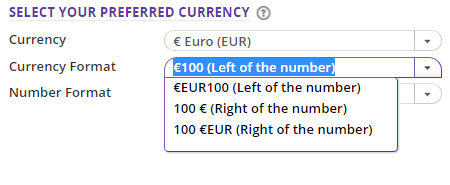
2) After you have your gateway set to the currency you are using, click your email address in the top right and click on Administration > Localization to select your currency setting in ONTRAPORT. You can choose the symbol and currency code, and whether it appears before or after the amount. And, you can choose to use the comma for the decimal separator instead of the period.
3) We strongly recommend you process a test transaction and verify it is processed through your merchant gateway and bank account in the way you wish. If you have problems please contact Support.
We have more information in our knowledge base article at Integrating a Payment Gateway - Currency Options

