Official comment

You can place countdown timers on your landing pages using our countdown timer block.
For emails, you may want to use something like NiftyImages.com which allows you to embed personalized images and countdown timers. NiftyImages enables you to personalize images like ONTRAPORT Purls and Merge Fields.
Note: At this time, using NiftyImages requires that you use our HTML email editor and does not work with ONTRAmail. You can copy the ONTRAmail source code and replace an image with a NiftyImages personalized Image or a NiftyImages countdown timer. It is possible that this will make the email less mobile responsive.
Here are instructions for inserting a NiftyImages image or countdown timer in an ONTRAPORT HTML email.
1. Create a New Image or Countdown timer in NiftyImages. Once created, click the Get HTML button.
2. Click the Change ESP link and select ONTRAPORT from the dropdown menu.
3. Copy the HTML Code

4. In ONTRAPORT, click Contacts > Messages and click the New Message button.
5. Select the HTML Email editor.
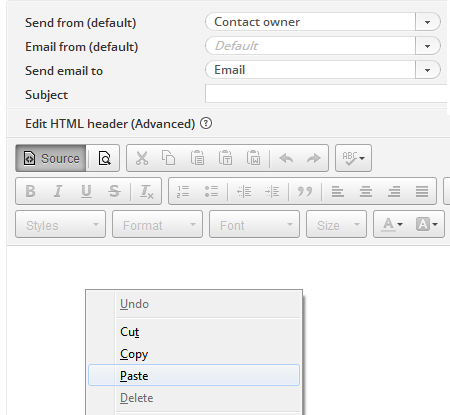
6. Click the Source button and right click, and paste, the NiftyImages HTML code into the page. You may wish to add paragraph tags around the copied code (see below)
<p><img src="https://xxx.niftyimages.com/xx/xxx?txt=[First Name]"</ p>
7. Click the Source button again. The email is now rendered in the editor window.
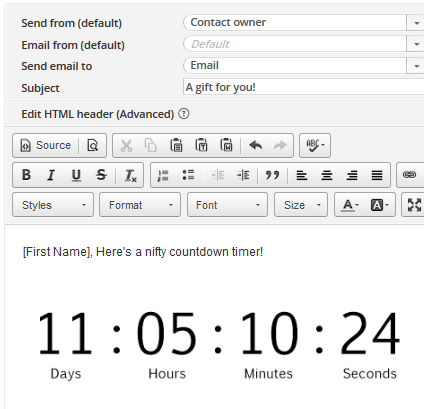
8. Finish setting up your email and don't forget to hit the copy from HTML button.
TIP: Countdown timers begin when they are created.

