

[Editor's Note: David Carlson is the ONTRAPORT engineer that created the page referenced above]
For a fixed footer or other block simply target the block's container class and add the following code to your custom header code in the settings tab of your ONTRApage:
<style>
.block-style-100 {
 position:fixed;
 bottom:0;
 z-index:999999;
}
</style>
You can update the id in the "block-style-100" line with the block's opt-block-style-id. In the example code above I am using the block with id 100.
One way to find the block ID is to toggle the visibility of all the other blocks on the ONTRApage to off (red), then click the "Preview" button.
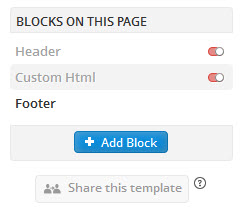
Switch to the tab with the previewed page and view the source of the page (usually available using the right click menu) and search for opt-block-style-id=
On this page we can see the footer block is opt-block-style-id="161"

In the code, I would replace the line
.block-style-100 {
With this line, using the "161" portion of the opt-block-style-id="161" line:
.block-style-161 {

