Post

2 followers Follow
0
Avatar

Create Video Backgrounds in ONTRApages

Frank Hagan

How can we create video backgrounds on ONTRApages like the ones found at https://ontraport.com/careers? They look really slick but I don't see them in any of the templates.

Answered

Please to leave a comment.

2 comments

1
Avatar

[Editor's note: David Carlson is the ONTRAPORT engineer who implemented the video background on the ONTRAPORT careers site]

Simplest way to do video background:

  1. Host the video somewhere in mp4 format. (ONTRAPORT is a good place!)
  2. Add a custom HTML block and add this code 
  3. Update the video URL in the src property in that code with your hosted video's URL from step 1
  4. Make the ONTRApage background transparent by selecting "No Background" on the Page Background drop down:
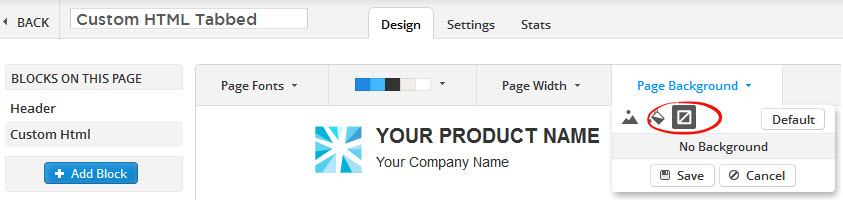


  5. Add a block and make the block's background transparent. This block will "overlay" the video in the background, so a text block works nicely here. 
  6. While editing the block, click "Block Spacing" and increase the top and bottom spacing to show more of the video!



David Carlson 1 vote
Comment actions Permalink
0
Avatar

Here is the code block from the GitHub Link so you can copy and paste it from here:


 <style>
.hero-video {
position: fixed;
right: 0;
bottom: 0;
min-width: 100%;
min-height: 100%;
width: auto;
height: auto;
z-index: -100;
background: #000;
background-size: cover;
}
</style>
<div class="video-container">
<video class="hero-video" preload="auto" loop="" autoplay="">
<source src="https://embedwistia-a.akamaihd.net/deliveries/3e4b575c0331bcd2cf639ec1c2133fba39601ccb/file.mp4" type="video/mp4">
</video>
</div>
Frank Hagan 0 votes
Comment actions Permalink