Post

2 followers Follow
0
Avatar

WPEngine and caching - help!

Frank Hagan

I use WP Engine as my webhost and love the platform. But they have something called Evercache that looks like it is interfering with my PilotPress protected pages. What can I do?

Answered

Official comment

Avatar

WPEngine is a popular, premium WordPress host that includes a power server-side cache system they call Evercache.

Lately, they have also been using other caching techniques, including drop in plugins for caching. 

All caches serve the page from memory without checking to see if the logged in user has permission to see the page. Non-members can view the page this way, but often PilotPress will jump into action after the fact and try to redirect the non-member away. Often this results in the login box appearing on the protected page, or a valid member being redirected back to the original log in page.

Until recently, WPEngine support was very helpful in excluding pages from their proprietary cache system. Recently they have stopped being as helpful, and several of our clients have had to move away from their proprietary hosting platform.

We recommend using another web host for your site if WPEngine is unable to disable all cache from your membership pages. 

Frank Hagan
Comment actions Permalink

Please to leave a comment.

5 comments

0
Avatar

I'm talking with WPEngine right now. They say they can exclude URLs, cookies, and query arguments. I'll be checking with support when they open to see which of these can be used. Been using WPEngine for awhile now and really like the security and support. I'd rather not have to switch, but will if it means my members are inconvenienced.

Thanks for posting this.

John Crewdson 0 votes
Comment actions Permalink
0
Avatar

In that case, where they will exclude URLs, it would make sense to create all your protected content under a folder like "membership". Then you can have them exclude the URL with a wildcard, and then also the Customer Center and Partner Center URLs:

http://<<your-domain.com>>/membership/*

http://<<your-domain.com>>/customer_center

http://<<your-domain.com>>/partner_center

Frank Hagan 0 votes
Comment actions Permalink
0
Avatar

Thanks for this information. I'm having a little trouble with it though. To use the Pilotpress plugin, I have to use the post name permalink structure. This is shown as http://<site url>/post-name/. You mentioned setting this up under a separate folder. I've tried searching for how this works and have been unable to find it. Do have a link to a description of this?

Thanks again

John Crewdson 0 votes
Comment actions Permalink
0
Avatar

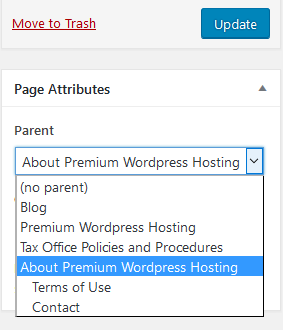
Sure, say you create a Page named "Members", and protect it. Then, you make that the parent page for all of your other protected content. Using the %postname% permalink format, the page names of pages named "Page One" and "Page Two" with "Members" as a parent will be similar to this:

https://anydomain.com/members/page-one
https://anydomain.com/members/page-two

By exempting https://anydomain.com/members/* from the caching WP Engine can exclude all your protected content without you having to submit a ticket for each new page you add. 

You can find the Parent page setting when editing a page in the right sidebar under Page Attributes. In this example the page is being placed under the "About Premium Wordpress Hosting" parent page. 


Frank Hagan 0 votes
Comment actions Permalink