Post

2 followers Follow
0
Avatar

Mobile, shmobile - can I force ONTRApages to display at the width I want?

Frank Hagan

I want to enforce a minimum width on my ONTRApage; I don't care about those mobile devices out there. Can I do it?

Answered

Official comment

Avatar

We have a new feature for ONTRApages that will help for mobile clients ... you can now edit the font, font face, font size, line spacing and the background padding for the mobile version using the "Mobile Display View" button in the editor. The same function now exists in ONTRAmail as well.

Details for ONTRApages at: https://support.ontraport.com/hc/en-us/articles/115008384948-Editing-Content-in-ONTRApages-Blocks (in the "Edit Mobile Fonts and Backgrounds" section)

For ONTRAmail, see https://support.ontraport.com/hc/en-us/articles/217882588#mobile-view

Frank Hagan
Comment actions Permalink

Please to leave a comment.

4 comments

0
Avatar

You can add in a little script to force an ONTRApage to render at a set width, bypassing mobile responsiveness. On the Settings tab, add this into the Custom header code section:

<script>
  var viewport = document.querySelector("meta[name=viewport]");
  viewport.setAttribute('content', width=1440);
</script>

Replace the 1440 with the width, in pixels, that you want. 

Kevin Eales Monroe 0 votes
Comment actions Permalink
0
Avatar

You can also adjust the page width independently now for the mobile version. Often, when setting the desktop version to 60%, it forced the mobile version to be too small. Now you can set the mobile width at "Full" even if the desktop width is set smaller.

Frank Hagan 0 votes
Comment actions Permalink
0
Avatar

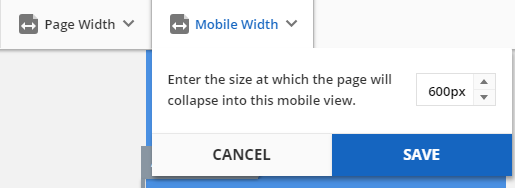
In Pages v3 you can also set the mobile view breakpoint - the pixel width where the elements will stack responsively instead of resizing on the screen. In Mobile View choose the Mobile Width drop down and edit the width from the default of 600px up to 1920px. 

Frank Hagan 0 votes
Comment actions Permalink