Official comment

Thanks for the feature request! While this is being considered there are two other ways that might accomplish your goal.
You can put "Score" as one of the columns in the Contacts Collection and then click on it to sort the contacts by score. That can be a way to see the highest scoring contacts without creating a specific group of contacts like "scores above 300".
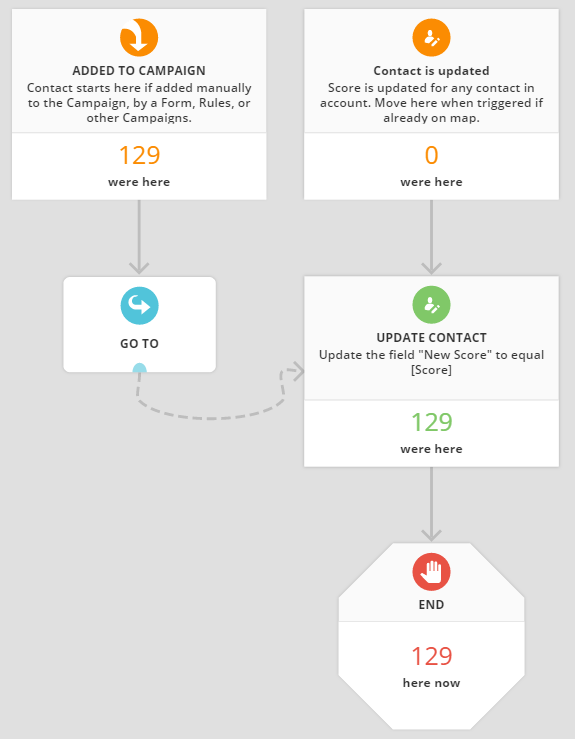
The other alternative is to create a simple campaign. Create a new numeric field and name it "New Score". Then create the elements as shown here.
Then use a group action to add all your contacts to the campaign. The campaign is very simple, but will keep the "New Score" field updated to equal the "Score" field automatically:
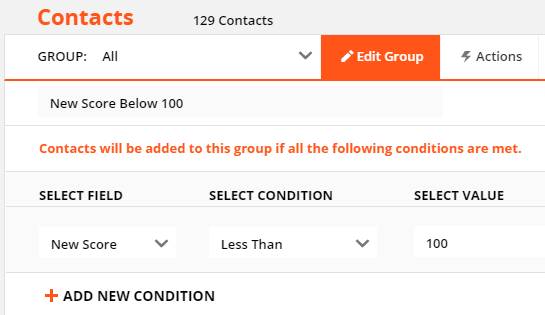
Then create a Group using the new field "New Score" just like you would with Score if it's added to the built in group criteria. Here's a group that will show contacts that have dipped below 100 in the new field "New Score".