Post

2 followers Follow
0
Avatar

Ability to show or hide an element on mobile / desktop

Angela C1M

At an element level, so I don't need to make a specific block, it would be good to be able to show or hide an element in either desktop or mobile view.

For example, I want to have a divider on a mobile page, but it's not necessary on the desktop page. Even if I create it in mobile, it's still there in desktop without any way to hide it (that I can see).

Official comment

Avatar

Thanks for your feature request for element level "show / hide" capabilities!

For the divider, you can put it in a block and then make the block visible only on mobile by editing the block > Display Settings and selecting "Mobile Only" from the drop down:
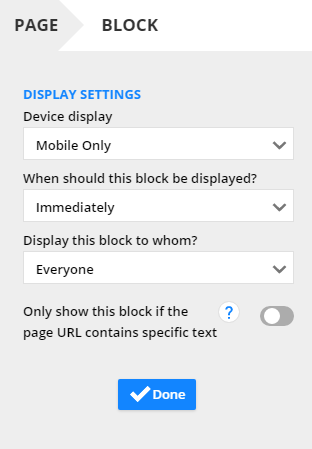
 

That will hide that block from the desktop view, but include it in the mobile view. 


Frank Hagan
Comment actions Permalink

Please to leave a comment.

3 comments

0
Avatar

I understand that you can change the display settings for blocks, but this isn't always something that works for the layout. It also doesn't work for global blocks, as they are constrained to being a single block (obviously!), nor does it work for elements that are in a section of a block, so a single cell in a row / column.

So for situations where I've got something like 2 columns in a block, that collapses for mobile into a single column, I want to be able to add a divider at the bottom of the first column in mobile only to split the copy up. The only way to do this with blocks is create 2 separate blocks, one for mobile, one for desktop, & manage their display settings individually. Which I have done when I absolutely needed it, but which isn't a very elegant solution & doesn't work for global blocks.

Being able to show & hide content at an element level with the same amount of control as is given in the block display settings would be incredibly useful, as managing these differences across entire blocks or not makes for very limited functionality.

Angela C1M 0 votes
Comment actions Permalink
0
Avatar

Yes, thank you for the explanation! We will keep this feature request open for others to comment on and vote up!

Frank Hagan 0 votes
Comment actions Permalink