Post

3 followers Follow
3
Avatar

Import process refinement

Molly Patrick

Since January of 2021 we have manually entered 3K email addresses into our double opt-in form. The leads are people who voluntarily give us their email address in order to receive our newsletter when answering questions to join our social media group. 

While we cannot get away from the manual work to collect this information from our social media group, secondary manual work to enter the email addresses one-by-one into an OP opt-in form could be completely avoided by using OP's import tool. 

However, as currently designed, the import tool is rudimentary and poses a number of hurdles.

First, I would like to request an option to ignore duplicate email addresses on the import list so that we do not have to manually scrub the list for leads/customers already in our system. I'm told this is a feature already offered by other email marketing tools.

Second, request an option that allows saving rules during the import process.  While it appears that this would be the case given OP asks for the rule to be named, in fact, rules are not saved and must be recreated with each import.

Third, request a way to send the double opt-in email on import so that the list can be imported as an unconfirmed status similar to the automation that would occur based on filling out an opt-in form manually.  Currently, the bulk email import options are: 1) import as single opt-in or 2) transactional only.  Both of these options are problematic for our import need.  Single opt-in is no good because we need to manually add the leads to the marketing campaign they would otherwise be added to had they filled out our opt-in form, but we're not able to do that unless we make them all transactional only because single opt-in status allows sending marketing emails by default, thereby bypassing the double opt-in process. We want to maintain the integrity of our list.

We've tried a transactional-only import, except the lack of ability to remove duplicates in an automated fashion means we risk changing the bulk email status of already confirmed leads/customers on the list. Therefore, we have to go an extra step to export our entire list and then bounce the import list off from the massive database before import.  Not an effective use of time for our small team.

Thank you for the consideration.

Official comment

Avatar

Thank you for your feature request. Part of it is already possible during the import process, so I'll outline it below. 

First, I would like to request an option to ignore duplicate email addresses on the import list so that we do not have to manually scrub the list for leads/customers already in our system. I'm told this is a feature already offered by other email marketing tools.

The default settings already do this. We call it "merge and underwrite" (the default) or "merge and overwrite". We index on the email address. You will find these settings in step 3 of the importer. Here's what our import instructions say about these settings:

Step 3 of the wizard — Import Settings:

  1. “Duplicate Contact Import Settings” — These will determine how the contacts on your .csv are imported into your account.
    1. Merge and underwrite with new imported data (default): This setting doesn’t change any existing data in your record, but it adds new data. For example, if you have a contact record that doesn’t have an office phone number saved, you can import data to fill in that blank field. This is the best setting for most use cases because you won’t duplicate or overwrite any info.
    2. Merge and overwrite with new imported data: This setting replaces the information saved in your records with your imported data. For example, if your record has a phone number saved and you import another, your import will update that phone number. Use this option with caution because it’s possible to overwrite data that you didn’t intend to.
    3. Create new entry: This setting always creates a new record in Ontraport for every row in your .csv. Since this option doesn’t merge any data, it can lead to duplicate records. You can always find and merge duplicate contacts, but that is a manual process.

That will work even with duplicates in the same CSV file you are importing. The contacts are added sequentially, so a contact on row 1 is added to the database and a duplicate on row 117 will be merged with it according to those settings. 

Second, request an option that allows saving rules during the import process.  While it appears that this would be the case given OP asks for the rule to be named, in fact, rules are not saved and must be recreated with each import.

Thank you for this request! This could be very handy for people and we'll investigate adding it!

Third, request a way to send the double opt-in email on import so that the list can be imported as an unconfirmed status similar to the automation that would occur based on filling out an opt-in form manually.

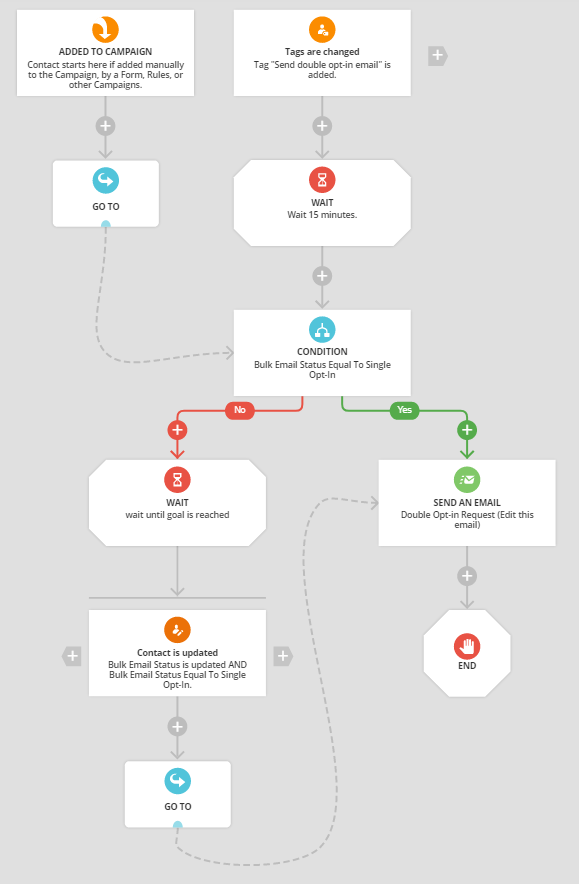
Contacts are imported as single opt-in, and you can use a campaign to send them an email with a double opt-in request. Here is a campaign you can use. Click that link to import it into your account. You can also add this campaign by going to Campaigns > Add New and searching for the campaign named "Send double opt-in email after importing contacts". 

The campaign collects any contact who has the tag "Send double opt-in email" added to it. Add this tag using a rule in step 5 of the import (having the rule saved would certainly help here!)

The campaign waits 15 minutes for processing of the imported contacts, and checks to see if their bulk email status is set to "Single Opt-In". If they are, they are sent the email requesting them to double opt-in. If not, they are sent to wait for the bulk email status field to change to "Single Opt-In". This is added in case the import is delayed in processing for manual approval by Ontraport. As soon as they are approved, the campaign sends them the email. 
Frank Hagan
Comment actions Permalink

Please to leave a comment.

3 comments

0
Avatar

Thank you, Frank!

Regarding number 1, yes, I've read the settings. The merge and underwrite feature is not working as it would seem it should.  When we select merge and underwrite and then add the option to import the list as transactional only, BES is overwritten to transactional only for dups already in OP even if they are currently opted in. Having the ability to ignore dups altogether would prevent this or, alternatively, adjusting the import so that merge and underwrite applies to transactional only imports would accomplish the same: preserving the BES of dups already in OP.

Re: #2, Great!

Re: #3, we want to avoid importing new social media leads as single opt-in.  We want them to be either "unconfirmed" or "transactional only" while we wait for them to confirm double opt-in. 

We already have a functioning audit process in place to manage updating the BES status of transactional-only profiles that later make a purchase or request content from us.

To keep our lists clean and automation organized, we do not want single opt-ins hanging out that have not set up a profile in our classroom for a trial product or made a purchase from us.  This is not currently possible with the import tool.

Thank you!

Molly Patrick 0 votes
Comment actions Permalink
0
Avatar

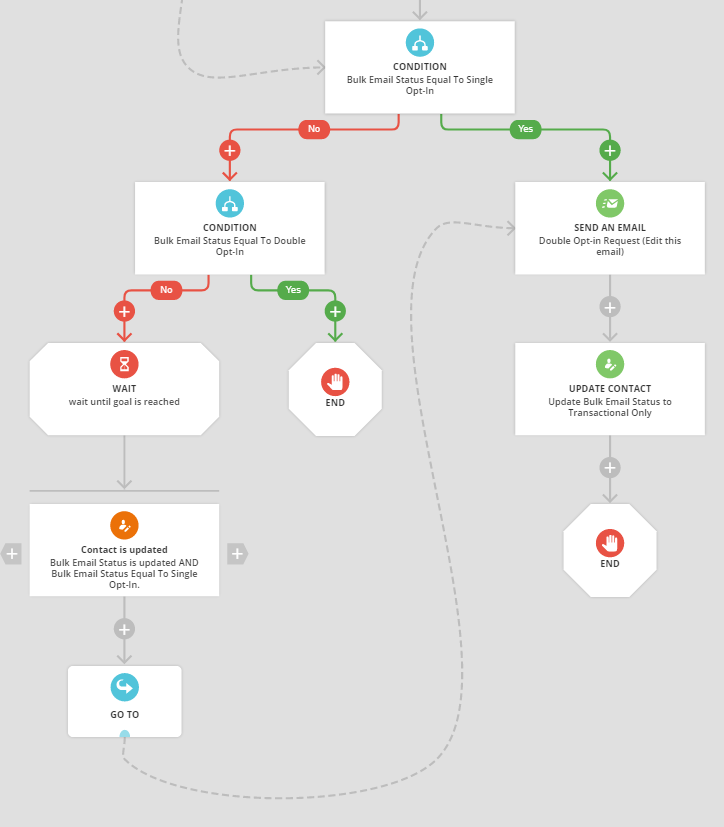
Hi Molly - yes, the merge and underwrite would not work when you want to import someone as "Transactional Only". That setting takes precedence over everything else. I would recommend not importing them that way, and allow them to get added as a single opt-in. Then, in the campaign after sending them the double opt-in email, change their bulk email status field to "Transactional Only" using the Update Contact element. 

You might also want to add another condition on the "No" path of the condition in the campaign I show above. Test for "Double Opt-In" and on the "Yes" path just put an End. On the "No" side have the Goal. That part of the campaign would look like this:

That allows you to automate sending of the double opt-in request and still have them "Transactional Only" after you send it. If you import them as "Transactional Only" it's harder because you can't automate sending a marketing email to them (the email asking for them to opt in is itself a marketing email). 

Let me know if that makes sense! 

Frank Hagan 0 votes
Comment actions Permalink