Post

1 follower Follow
0
Avatar

How I can assign a Task to a "Non-User" (through an email)

Ken Hawkins

I want to use a Sequence to Assign a Task and get feedback from a Task Outcome.

But I want to do this via email to an external person who is not a user.

What are the steps to do this?

Answered

Official comment

Avatar

Hi Ken,

For a quick overview of how to create tasks and task outcomes please view this slidedeck: http://support.ontraport.com/entries/66177314-How-do-I-Automate-employee-actions

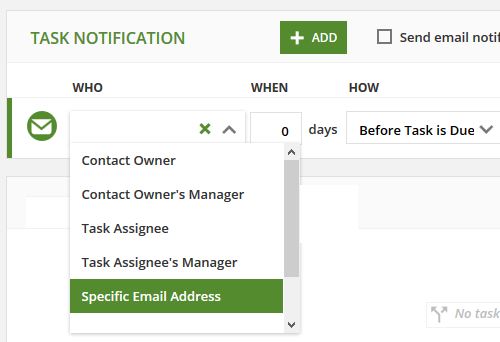
Specifically, to send a task to a non user you'll need to set the notification to go to a "specific email address":


While your user will still be the owner of the task the email similar to this will be sent to your agent: 
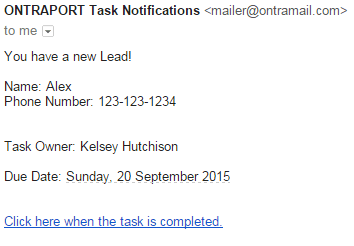
From that link in the email your agent can select and outcome where the follow up actions are dictated by the outcome rules you've created on the task settings. Please reply here or email support@ontraport.com if you have any further questions.


Customer Support
Comment actions Permalink

Please to leave a comment.

6 comments

0
Avatar

Thankyou Sean, everything worked great and your screen shots were most helpful.

1 minor tweak I want to do...

Is there a way to format dates in a merge field?

Because I am in AUS some "merge field dates" in my Task could get confused as we use dd/mm/yyyy format.

Thx again.

Ken Hawkins 0 votes
Comment actions Permalink
0
Avatar

Hi Ken,

From within you Admin > Date Format setting in your account you may select the date format that works for you. The direct link to this setting is here if you're logged in to your account.

Customer Support 0 votes
Comment actions Permalink
0
Avatar

Sorry Sean, I should have mentioned that I have already done that - probably 2 weeks ago when I 1st joined.

Could it have something to do with the fact that the Dataset is a Custom Object?

Ken Hawkins 0 votes
Comment actions Permalink
0
Avatar

Hi Ken,

That may be it. Are you custom object date fields automatically setting up as mm/dd/yyyy ?


Customer Support 0 votes
Comment actions Permalink
0
Avatar

Hi Sean,

The custom object date fields do show as dd/mm/yyyy when I add a new record.

If I export the data and read them into Excel as text, they show as mm-dd-yyyy.

Does this make sense or help in any way?

Unfortunately I don't have any date fields in the base contact dataset to test an export or adding a new record.

Ken Hawkins 0 votes
Comment actions Permalink