Post

3 followers Follow
0
Avatar

Changing a default footer on message

Paul Douglas-Irving

Hi, 


I am trying to change the default footer that goes on all of the emails sent but I am unable to find where I can edit it. It doesn't show on the message template, only when sent. 


Any help would be appreciated! 


thanks :) 

Completed

Official comment

Avatar

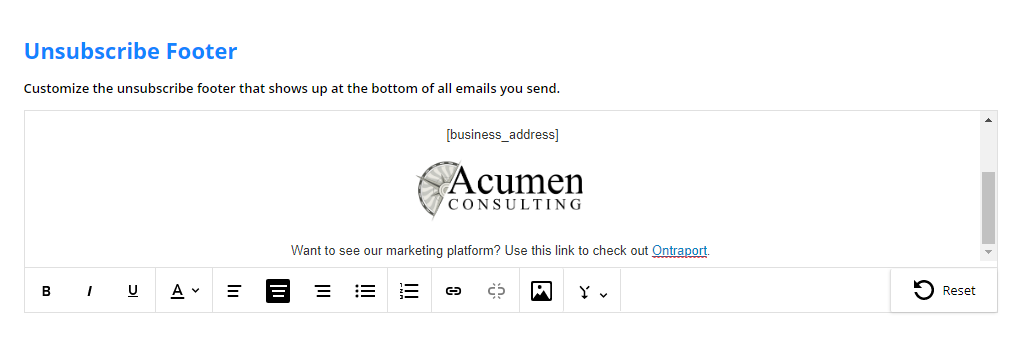
You can now edit your Unsubscribe Footer by visiting Administration > Business Info. Select the "Unsubscribe Footer" option to create your own wording and remove and/or replace the Ontraport logo.

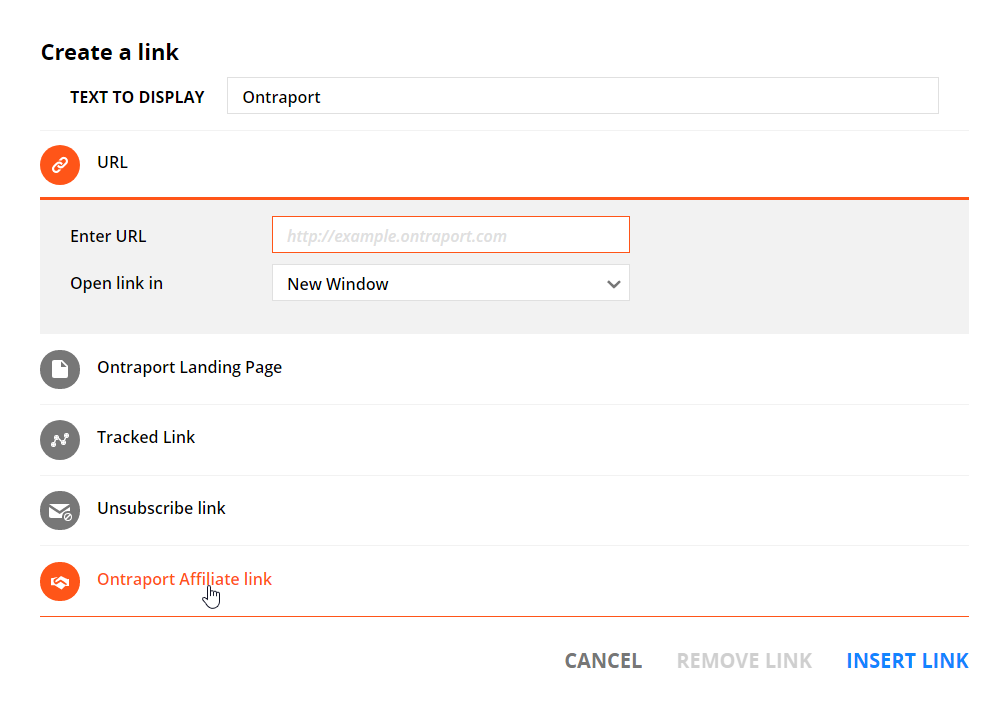
The Ontraport logo is also your affiliate / partner link, providing a 25% commission per month for any new customers you send our way. You can still include this link after removing the logo by using the link dialog box. It includes both the Unsubscribe Link and the Ontraport Affiliate link.

The unsubscribe footer editor:
Here is the link dialog box that pops up when you highlight text and click the link icon. Note the two additions, the Unsubscribe Link and Ontraport Affiliate link. You can create your own unsubscribe text such as "Unsubscribe", "Opt Out" or "Remove me from your mailing list" by highlighting the text, clicking the link icon and selecting the "Unsubscribe Link". 
Frank Hagan
Comment actions Permalink

Please to leave a comment.

4 comments

0
Avatar

Hi Paul,

The company information you see at the bottom of emails is drawn from the Administrator's user profile. If you are the Admin, click your email at the top right, then "Personal Profile". The company name and address information is from that screen.

If you have more than one User in the account, the company information can be taken from the "Contact Owner" profile. By default that is the Administrator, but some of our clients run two separate businesses or divisions within their ONTRAPORT account by specifying another user as the "Contact Owner" of some contacts. That User Profile then fills in the company name and address information at the bottom of every bulk email. We have a short article that covers using ONTRAPORT for two or more businesses using this method at https://support.ontraport.com/hc/en-us/articles/115007437807-Users-as-Contact-Owners


Frank Hagan 0 votes
Comment actions Permalink
0
Avatar

I wanted to watch the slide show on using ontraport for 2 businesses but its no longer available. Can you please update the link? Thanks

Michelle Green 0 votes
Comment actions Permalink
0
Avatar

Michelle - you'll find the information on how to use the Users for separate companies in this article.

The older slide decks are no longer available as our interface has changed.

Frank Hagan 0 votes
Comment actions Permalink