Post

3 followers Follow
3
Avatar

Have localization settings be able to select the default country code for SMS

Matthew Bixby

While the Forms that we make can have the country Field set to make sure this changes the SMS Fields, it's not very efficient or user friendly to have to do that to our clients. It would be great if localization could change the default from +1 (US country code) to whichever county we are in.


Submitted on behalf of Cormin Pohontu

Completed

Official comment

Avatar

This is already done, assuming you have properly set up your ONTRAPORT account. Here is how the SMS number is formatted from our SMS Overview article:
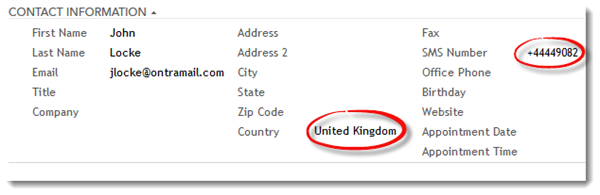
If the SMS number is imported or entered with a properly formatted country code the number is saved in that format. If the number is entered without a country code, ONTRAPORT will format it based on the following criteria:

  • The contact record's Country field, as shown in the image above

  • If there is no Country set in the contact record, the Contact Owner's country setting takes effect. This allows you to automatically format the SMS numbers of contacts assigned to a regional salesperson or business division. See Setting the Contact Owner's Country Field below for more information.

  • If no country is specified in either the contact record or the Contact Owner's information the number will be formatted in the US / Canada format with a +1 country code.


Setting the Contact Owner's Country Field

The Contact Owner is one of the ONTRAPORT Users. To edit the User information, click on the email address at the top right of the screen, then select Manage Users.

manage-users.png

 Click each User and click Business Country to edit the country field.

manage-users-country.png


Manually entering or importing the SMS number without a country code will trigger the addition of the country code under these rules.

Numbers already formatted with a country code will be added or imported as is, and will not be changed.

Contacts who opt in via SMS, by sending a text message to your ONTRAPORT SMS number, will have the country code associated with their opt-in number. 

Contacts who opt in using an ONTRAPORT form will have the country code populated based on the rules above, starting with the IP address they opt in from (if geo-location is available). 

Frank Hagan
Comment actions Permalink

Please to leave a comment.

3 comments

0
Avatar

Hey Frank, correct me if I'm wrong, but the above response to this feature request isn't actually accurate at the moment, as geolocate does not update the SMS country code, it is ignored.

Only making users manually enter their country works (which I'm not willing to do on an optin form as more fields = reduced conversions). I'm surprised to find that this is still a required fix

(Also mentioned in this feature request here, so maybe this is an old post https://support.ontraport.com/hc/en-us/community/posts/360014377613-Update-SMS-Country-Code-when-Country-Field-is-Updated?input_string=SMS%20country%20code%20recognise )

For some reason, the SMS country code does not recognise geolocate country, and instead defaults to the contact owner's country code (Australia), which makes no sense.

Would be great if this could be fixed soon, it seems like a no brainer.

Andrea Featherstone 0 votes
Comment actions Permalink
0
Avatar

Hey Andrea - the problem is with a new contact entering their SMS number on an opt-in form.

We add the contact first, then run geo-ip. The reason is that the geo-ip process relies on a lookup, and that can take some time. So rather than delay the form processing, or risk not writing the contact record if there's a failure in the geo-ip database lookup, we write the contact record first. At the time the SMS number is added, there is no country field, even though it is filled in a bit later. The rules above then apply.

We don't like to edit a field that's already filled because geo-ip is somewhat unreliable. Our geo-ip for Santa Barbara returns San Jose as the city, for example, and it's not too unusual to have the same issue with the country code. The best solution right now is to add the Country field to the form so it writes to the contact record, and then the SMS field is formatted.

For anyone else reading this, we do have a feature request to address this here.  I know you have already voted it up, but if others would as well it will help us prioritize it. 

Frank Hagan 0 votes
Comment actions Permalink