Official comment

Note: If you would like to see how to accomplish this within a Campaign, click here to view our Q & A for it!
To automate this kind of action you can create a Step Sequence that assumes the contact doesn't open the first email. Then after the first email, insert a rule that checks whether or not the contact has opened the email or clicked a link in your email.
Here is a map that shows you how to build it. This use case assumes you just want to wait until the next day to check to see if the email has been opened or a link in it clicked. If it has, the Rule unsubscribes them from the Step Sequence
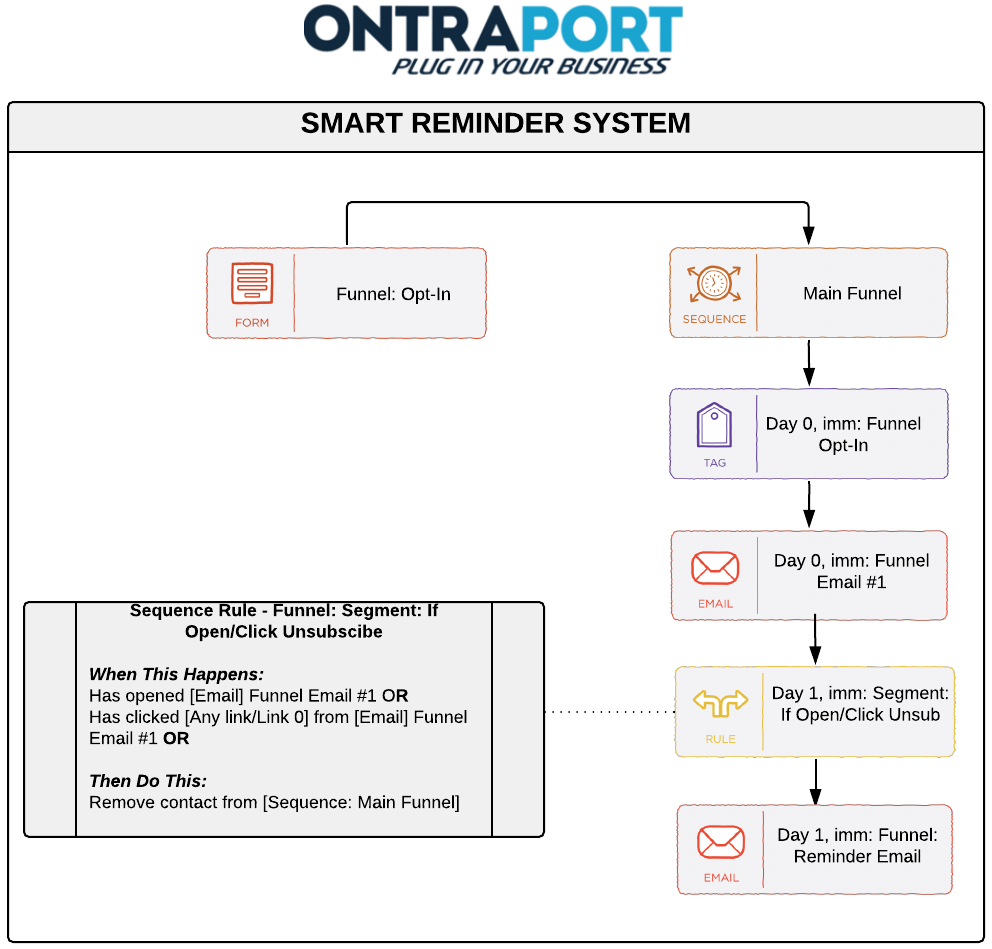
There are many ways to do this, of course. You could have a global Rule set to unsubscribe the contact when they open or click the email and just a series of emails in the Step Sequence. This would be easier to set up if you have many reminder emails (it eliminates having to create a Rule between each email to check the status).
For more on the ways you can resend an email (and even if you should resend an email) see our blog article 5 Ways to Resend an Email (and why you may not want to).

