
Official comment

Hey John - here's a link that might help: http://api.ontraport.com/doc/
You can have ONTRAPORT charge the transaction via the API using the default card on file for the contact, or you can simply log the transaction without having ONTRAPORT process it. The parameter "chargeNow" can be set to either "chargeNow" as shown in this example: http://api.ontraport.com/doc/#process-a-transaction-manually or set to "chargeLog" that will simply log the transaction without using the contact's credit card information on file. The links in the left hand column should help once you get there.
One way to see all the objects in the account is to use this page: https://api.ontraport.com/live/
You need API keys from a live ONTRAPORT account to use it. To get a listing of them all:
- Enter an API Key and APP ID at the upper right. When the keys are accepted the borders will turn from red to green.
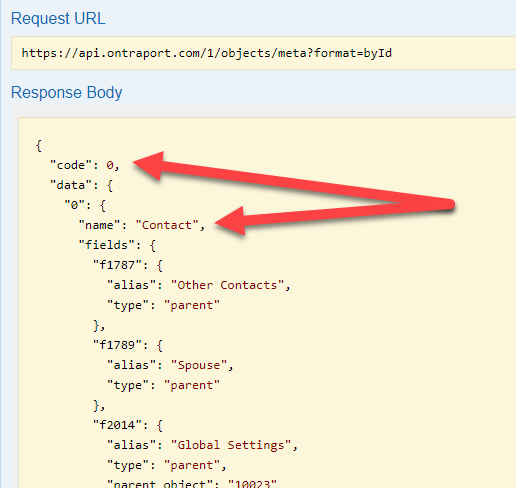
- Click on "Objects" (the first entry) and click the GET button next to /objects/meta
- Click the "Try it out!" button
The Response Body will show all of the contact fields in "0" (the contacts object) as well as the fields in any custom objects. You will see Object "5" is "Sequence", 7 is "Message", 14 is "Tag", etc.
We do provide support to developers using our apisupport@ontraport.com email address. Only a few of our front line support people are programmers, so that email address will get you to the right people. Attach a text file with the code you are using and the error message, if any. We use Zendesk and code directly in your email will be "processed" and not be complete.

