Post

3 followers Follow
0
Avatar

Ontrapage Survey Creation - Sum Function

Jared Kushi

I've created a questionnaire in Pages to be sent to contacts on a monthly basis. I created a series of customer fields for contacts to rank certain conditions that they experience, and need to be able to easily total it.

Is there a way to input a Sum function that would tally up the value of the individual responses?

Completed

Official comment

Avatar

If the field is an Integer or Currency type field you can expose it in the Contacts Collection by adding that field as a column. The total will be at the top of the column. You can then create Groups based on the contacts you want to show. 
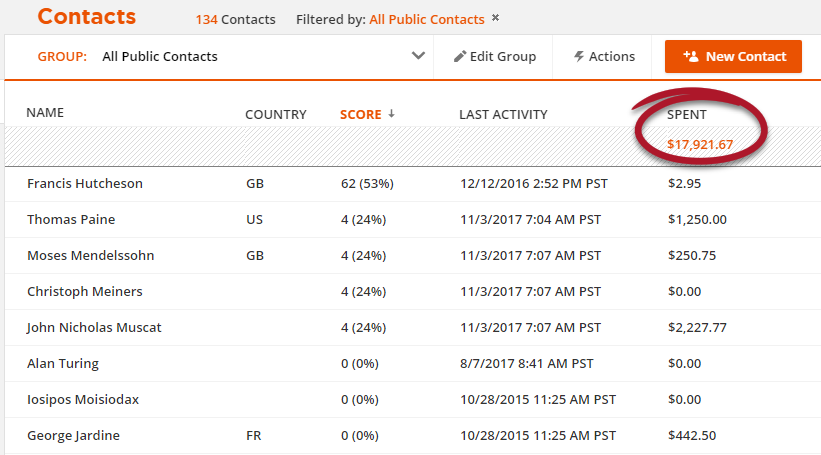
For instance, if you want to show only contacts who have been active in the last month you could use the criteria that the contact has a "Last Activity Date" >> "less than" (or, before) >> 10/1/2018 and add another condition that the "Last Activity Date" >> "greater than" (or, after) >> 8/31/2018. That would give you the Contacts that were active during the month of September, and you could see the score in that field for those contacts. 

Frank Hagan
Comment actions Permalink

Please to leave a comment.

3 comments

0
Avatar

Also, check out our Systems Setup Wizard for a simple survey, "Smiley Survey and Testimonial Generator". It will install a custom object (a separate database) linked to your contacts that stores their survey responses. You can use that example as a template for a more robust system. 

Navigate to Systems and click the "+ New System" button to reveal the System Setup Wizards!

Frank Hagan 0 votes
Comment actions Permalink
0
Avatar

Hi! You can accomplish a sum now. Rollup fields has released! I've pasted some information about it below: 

Rollup fields make it easier than ever to view and use the data in your account

Accessing and displaying different types of data is now easier than ever with the introduction of a new field type — rollup fields. Simply click a few buttons, and you're good to go.

This easy access to your stats will help you out in two big ways:

Get better insights to improve planning and management.
Find out things like:

  • How much revenue you’ve earned from certain products
  • The average deal size for each of your reps
  • How many outstanding tickets remain for project completion

Display info on your web pages that drives results.

Show things like:

  • How many lessons they have left in a course
  • Which blog posts are most popular
  • How many seats are left for an upcoming event

All this data keeps your customers informed and engaged. And it helps your team view crucial business stats, making it easier for you to close sales.

Learn more about rollup fields here.

Product Team 0 votes
Comment actions Permalink